Credits
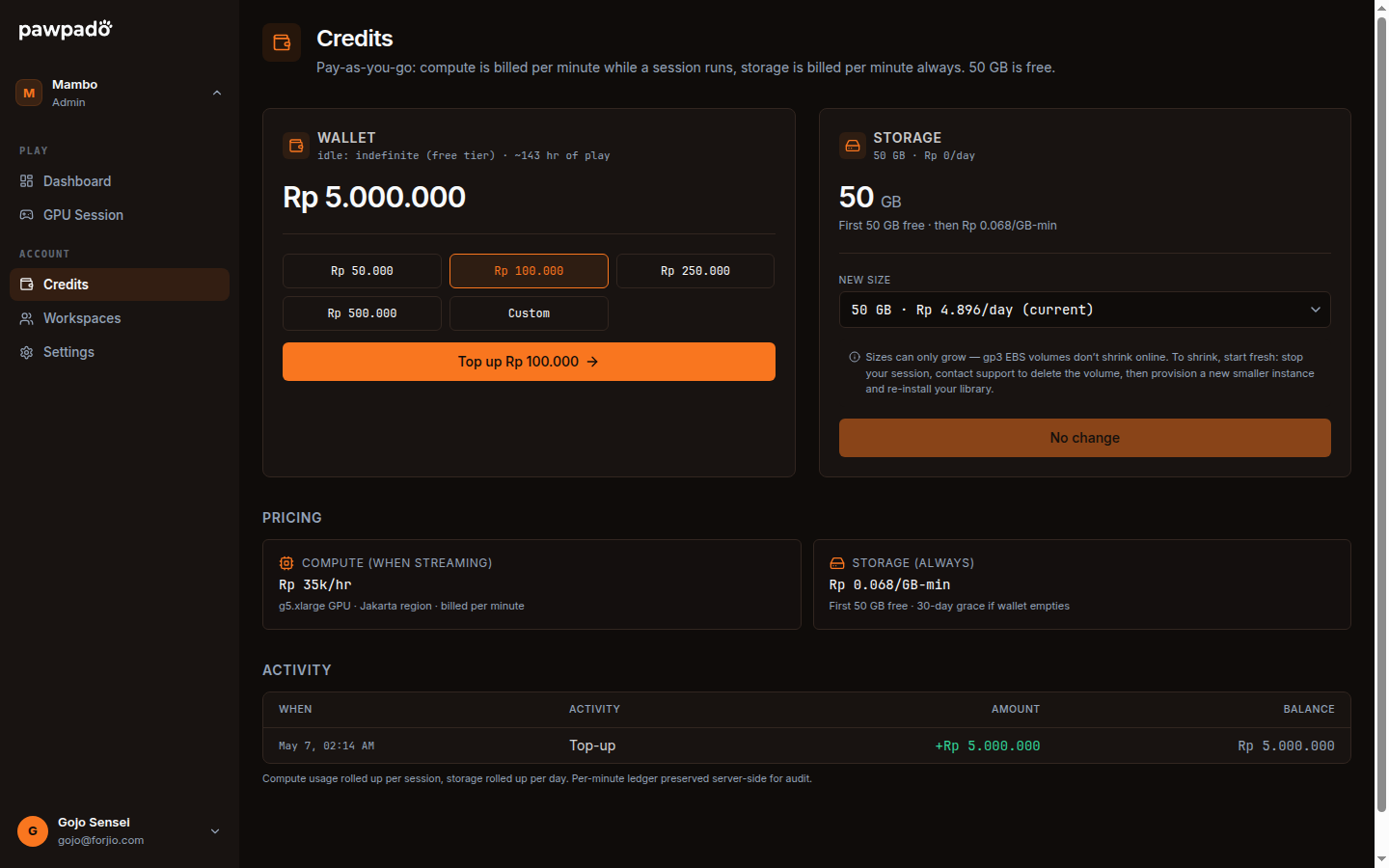
The Credits page at /dashboard/credits is where you manage your prepaid balance. Pawpado is pay-as-you-go: you top up credits, the meter draws them down per minute of compute and per gigabyte-month of storage, and you can withdraw what's left whenever you want.
What's on the page
Three cards, stacked top to bottom.
1. Balance card
The headline number: your current credit balance, denominated in IDR (or USD if you topped up in USD — one wallet per currency).
Below it:
- Projected runtime — how many hours you can run a session at the current rate.
- Last updated — the wallet is refreshed in real time on top-up and on every meter tick, but the on-screen value pulls fresh every 30 seconds.
2. Top up card
Pick an amount or type a custom one. The shortcut buttons are roughly tuned for typical sessions:
| Button | Buys roughly |
|---|---|
| Rp 46,000 | ~1 hour |
| Rp 100,000 | ~2.4 hours |
| Rp 250,000 | ~6.0 hours |
| Rp 500,000 | ~11.9 hours |
These are estimates at the Casual all-in rate (Rp 46,000/hour). Hardcore is Rp 56,000/hour, and streaming above 1080p or on a second screen adds per hour. The exact per-minute rate is shown on this card.
Click Pay. Pawpado creates a Plugipay checkout session and redirects you. You pick a payment method (card, virtual account, e-wallet, QRIS), pay, and Plugipay redirects you back. The credit lands in your wallet within a few seconds of the webhook arriving.
Credits don't expire. Top up Rp 500,000 today, use Rp 100,000 this month and Rp 50,000 next month — the remaining Rp 350,000 sits there indefinitely.
3. Usage card
A bar chart of credit spent per day over the last 30 days, broken into:
- Compute — what you've spent on running sessions.
- Storage — what you've spent on your EBS volume.
A "Total spent" number at the top tells you what your average daily burn is. Useful for predicting how long a top-up will last.
Click any bar to see the underlying session list for that day — start time, duration, and credit cost per session.
The meters
How many meters draw from credits depends on your tier.
Session meter — every tier
Ticks every minute while session state is running. The rate is published on the Top up card: Rp 46,000/hour on Casual and Rp 56,000/hour on Hardcore, all-in — machine, disk, public IP and 1080p on one screen. Streaming at 720p lowers it; 1440p, 4K and each extra local-co-op screen raise it. Custom starts at Rp 59,000/hour — Rp 35,000 of compute on the smallest g5 plus the Rp 24,000 1080p streaming surcharge — and rises with the machine and the quality you pick.
The meter pauses immediately when state moves to stopping. Even if shutdown takes 30 seconds, you're not billed for those last 30 seconds.
On Casual and Hardcore this is the only meter. Stop the session and your balance stops moving completely — a month with no sessions costs nothing.
Storage meter — Custom only
Ticks every minute on the full size of your EBS volume (set on Settings → Storage), on Custom.
The rate is a flat per-GB-month figure (Rp 2,000/GB-month) shown on the Storage page. A 200 GB game library means the full 200 GB is billable — Rp 400,000/month, whether or not you play. A static IP adds Rp 85,000/month.
There is no storage meter on Casual or Hardcore: the disk ships with the machine image, is destroyed when the session stops, and its cost is already inside the hourly rate.
Insufficient credits
If your balance is too low, two things happen.
Before starting a session: the Start session button on the dashboard goes disabled if your balance is below ~15 minutes of compute. We prompt for a top-up.
During a session: if the wallet drains while running, Pawpado:
- Shows a banner in the portal warning you're under 15 minutes.
- Sends a notification email at 5 minutes.
- Auto-stops the session at 0. State moves to
failedwithINSUFFICIENT_CREDITS.
We don't drain you negative — the moment the balance hits zero, the meter stops the session, and your saved game data is safe on the EBS volume waiting for your next top-up.
Withdrawing credit
If you want to leave Pawpado, unused credit is refundable back to your original payment method. Go to Settings → Credits → Withdraw.
We can refund:
- Credit that hasn't been spent (anything still on the balance).
- Any unspent prepayment on storage that's still in the current minute.
We can't refund:
- Credit that's been burned on compute — that's already paid to AWS.
- Plugipay's processing fees on the original top-up (typically a small percent).
Withdrawals process within 3-5 business days through Plugipay's payout flow.
API and SDK
The credit balance is exposed at:
GET /api/v1/credits/me
Returns:
{
  "balanceCents": 8750000,
  "currency": "IDR",
  "storageGb": 200,
  "asOf": "2026-05-12T10:42:00Z"
}
To create a top-up session programmatically:
POST /api/v1/credits/topup
{ "amountCents": 10000000, "currency": "IDR" }
Returns a Plugipay hosted-checkout URL:
{
  "url": "https://plugipay.com/c/cs_…",
  "sessionId": "cs_…"
}
You redirect the user to url. Plugipay handles the payment and webhooks the result to Pawpado. The balance updates within seconds.
With the SDK:
const { url } = await pawpado.credits.topup({ amountCents: 10000000, currency: 'IDR' });
Tax and invoicing
VAT (10% in Indonesia) is included in the rates shown on the Top up card. The receipt for each top-up is a proper Plugipay invoice with your account email — downloadable from Billing.
If your account is a registered Indonesian business and you need NPWP fields on the invoice, fill them under Settings → Business. New invoices include them; historical receipts can be re-issued on request to support@forjio.com.
Next
- Sessions — the actions that spend credits.
- Concepts → Credits — the model.
- API overview — programmatic credit management.